






Introducing Reference Tables: Put your business data to work in LeadConduit
TL;DR
- Upload your own CSV files to Reference Tables and enrich incoming leads with business-specific data.
- Automatically match leads using one or multiple key columns, such as ZIP code, state, or product.
- Use enriched data to route leads by sales territory, support dynamic pricing, and add custom business attributes.
- Reduce reliance on external systems and custom integrations for straightforward data lookups.
- Easily update your reference data as business needs, territories, and pricing change.
Overview
Every business has unique information that helps determine how leads should be handled. Whether it’s assigning leads to sales territories, applying location-based pricing, or adding custom attributes, that information plays an important role in making effective lead management decisions.
But incorporating your own business data into lead workflows can be challenging. It often requires external systems, custom integrations, or additional manual processes to connect incoming leads with the information your business relies on.
That’s why we’re introducing Reference Tables, a new LeadConduit capability that makes it easier to bring your own business data directly into your lead workflows.
With Reference Tables, you can upload your own data, automatically match it against incoming leads, and use the resulting information to make more informed decisions about how those leads are processed.
What are Reference Tables?
Reference Tables allow you to upload CSV files containing business-specific information and use that data to enrich incoming leads within LeadConduit.
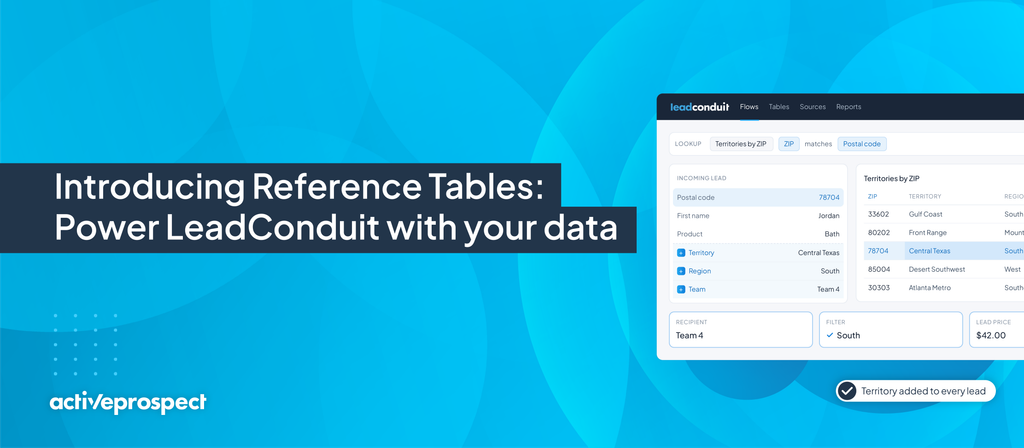
As leads enter your flow, LeadConduit can match a value from the incoming lead, such as a ZIP code, against a corresponding value in your Reference Table. You can match on one key column or several, such as state and product. When a match is found, LeadConduit adds the associated information to the lead.
That additional data can then be used to support lead routing, filtering, pricing, and other workflow decisions.
The result? More flexibility to manage leads according to your business rules, without relying on external systems for straightforward data lookups.
Three ways to put Reference Tables to work
1. Route leads to the right sales territory
For businesses operating across multiple regions, determining where a lead belongs is an important part of the lead management process.
With Reference Tables, you can upload a CSV containing ZIP codes and their corresponding sales territories. When a new lead enters LeadConduit, its ZIP code can be matched against your Reference Table, automatically adding the appropriate territory information. You can then use that information to route leads to the right sales team, location, or recipient.
Example:
- A home services company operates across several markets and assigns leads based on geographic territories.
- Instead of maintaining territory assignments in an external system, the company uploads its ZIP-code-to-territory mapping into LeadConduit.
- As leads arrive, LeadConduit enriches each matching lead with its designated territory, helping ensure it reaches the appropriate team.
2. Support dynamic lead pricing
Not every lead carries the same value. Factors such as geography, market demand, and business priorities can influence how much a company is willing to pay for a lead. Reference Tables make it easier to incorporate your own pricing information into lead processing.
For example, you can upload a CSV that associates ZIP codes with predefined lead prices. When an incoming lead matches a ZIP code in your table, LeadConduit can add the corresponding price as an attribute. LeadConduit uses the price from the matching row as the lead’s purchase price. If no row matches, it uses a fallback price you set. This works on standard submissions and on real-time bidding pings and posts.
That information can then help inform pricing decisions within your lead workflow.
Example:
- A lead buyer assigns different values to leads based on their geographic market.
- By maintaining those values in a Reference Table, the buyer can automatically enrich incoming leads with the appropriate pricing information rather than relying on hundreds of pricing rules or separate systems to perform the lookup.
- As market conditions change, the buyer can update the reference data to reflect new pricing priorities, with no direct flow edits
3. Enrich leads with custom business attributes
Every business has its own criteria for evaluating and processing leads. Maybe you categorize geographic markets by priority, assign internal team identifiers, or maintain custom classifications that help determine how leads should be handled.
Reference Tables let you incorporate that information directly into LeadConduit. By matching incoming lead data against your uploaded reference information, you can automatically add relevant business-specific attributes.
Example:
- A company maintains a list of ZIP codes categorized by market priority.
- Using Reference Tables, incoming leads can be enriched with their corresponding market classifications.
- The company can then use those classifications to filter or route leads based on its acquisition strategy.
Why use Reference Tables in LeadConduit?
Reference Tables give businesses greater control over how their own data influences lead processing. Here are some of the key benefits:
Make more informed lead decisions
Enrich incoming leads with information specific to your business so you can make routing, filtering, and pricing decisions based on more than the data originally submitted.
Reduce reliance on external systems
Bring straightforward data lookups directly into LeadConduit, reducing the need for separate services or custom integrations to retrieve business-specific information.
Customize lead workflows to your business
Use your own reference data to support the rules and processes that matter most to your organization.
Keep your business data current
As territories, pricing, or other business requirements change, update your reference data to keep your lead workflows aligned with your needs.
How to get started
Getting started with Reference Tables involves a few straightforward steps:
- Prepare your data: Create a CSV file containing the values you want to match against incoming leads, along with the corresponding information you want to add. Put the column headers in the first row.
- Create a reference table: Go to Assets → Reference Tables, select Create Reference Table and upload your CSV.
- Configure your lookup: Choose your key column(s) and the data to return.
- Use the enriched information: Incorporate the resulting attributes into your lead routing, filtering, or pricing workflows.
- Test your setup: Confirm that incoming lead values match your reference data and produce the expected results.
For example, a CSV containing ZIP codes and sales territories can help you automatically assign incoming leads to the appropriate market.
Put your business data to work
Your business data is valuable. It helps determine where leads should go, how they should be evaluated, and what they’re worth to your organization.
With Lead Enrichment using Reference Tables, you can bring that information directly into LeadConduit and use it to make smarter lead management decisions.
Whether you’re managing sales territories, applying custom pricing, or enriching leads with business-specific attributes, Reference Tables give you more flexibility to tailor your lead workflows to your needs.
Ready to get started? Explore Reference Tables in LeadConduit and discover how your own data can help you make more informed decisions about every lead.