
TrustedForm setup: A step-by-step guide
TL;DR
- TrustedForm helps marketers document and verify consumer consent, reduce compliance risk, and bring more transparency to lead generation.
- Setup typically includes five key steps: Sign up, implement Certify, verify consent requirements, retain certificates, and capture Insights data.
- TrustedForm share URLs make it easy to securely share proof of consent for audits, disputes, or legal review.
- The product suite includes Certify, Retain, Verify, Insights, and Bot Detection, each supporting a different part of compliance, lead validation, and optimization.
- Together, these tools help businesses simplify compliance, improve lead quality, detect fraud, and build a more trustworthy lead gen strategy.
Overview
Today, compliance is no longer a box to check – it’s a business-critical requirement. With rising concerns over data privacy, consent-based marketing has become the gold standard for acquiring leads ethically and legally. That’s where TrustedForm comes in.
In this blog post, we’ll walk you through a complete TrustedForm setup, explain TrustedForm’s mechanisms, show you how to create a TrustedForm share URL, and highlight the full suite of TrustedForm products that can strengthen your compliance and lead verification strategy. Let’s get started!
What is TrustedForm and why is it important?
If you’ve ever asked, “Can you explain TrustedForm?” – the short answer is this: TrustedForm is a real-time consent documentation solution developed by ActiveProspect. It helps document and verify consent while providing transparency into the consumer experience, origination and authenticity of leads.
TrustedForm independently captures and certifies proof when a consumer gives permission to be contacted through an online form. This is crucial for complying with regulations like the Telephone Consumer Protection Act (TCPA) and maintaining a reputation for ethical marketing.
Every time a user visits a form with TrustedForm installed, the system:
- Records the session details (e.g. time, page URL, IP address, browser).
- Creates a TrustedForm Certificate that can be used as third-party proof of consent.
- Generates a video-like session replay of the consent transaction.
- Assigns a TrustedForm Certificate URL, a unique identifier for the session.

Why a TrustedForm setup is a must for modern marketers
Whether you’re generating leads in-house or sourcing them from third-party vendors, a TrustedForm setup equips you with a powerful framework to protect your business and optimize your marketing efforts.
With a TrustedForm setup, you can:
- Clearly document when, where, and how consumer consent was obtained.
- Evaluate lead quality in real time, right at the point of capture.
- Significantly reduce your exposure to TCPA litigation.
And the best part? It’s easy to implement, highly scalable, and integrates seamlessly with most major CRMs and marketing automation platforms.
Building trust with transparency
Consumers are more privacy-conscious than ever. TrustedForm helps you demonstrate a clear commitment to transparency and ethical data collection. When your brand prioritizes consent and security, customers notice – and they’re more likely to engage and convert.
Staying ahead of compliance
In industries where regulations around data collection are strict, TrustedForm acts as your digital audit trail. It provides concrete, time-stamped evidence of consumer experiences – crucial during audits or legal disputes. With TrustedForm, you’re not just compliant; you’re confidently prepared.
Compliance, simplified
Forget manual checks and inconsistent processes. TrustedForm automates the capture, certification, and retention of consent records, removing the friction from your compliance workflow so your team can focus on driving results.
Step-by-step TrustedForm setup guide
Setting up TrustedForm is a straightforward process, but each step is essential to ensure you’re capturing valid, auditable consent. Here’s how to get started:
Step 1: Sign up for TrustedForm
To begin, you’ll need an ActiveProspect account. If you haven’t already, sign up and enable TrustedForm features as needed.
Step 2: Start documenting your lead creation
If you’re generating leads in-house, then you need to implement TrustedForm Certify (otherwise, skip to step 3).
This is the software that records user sessions and issues TrustedForm Certificates. Make sure to record the entire lead journey to guarantee you have thorough documentation. Certify will generate a TrustedForm Certificate URL, which should be stored alongside lead data in your database.

Step 3: Check if the lead met standard requirements to give consent
If you’re purchasing leads from a third-party vendor, it’s essential to have a process in place to confirm that the lead generation methods comply with applicable regulations, such as the TCPA, and meet your own business standards.
Once you receive a lead with a Certificate URL, use TrustedForm Verify to conduct a series of checks and due diligence for each lead. Through your lead distribution platform, make an API request to verify that the lead was shown an approved consent language or disclosure that met visibility requirements and used an acceptable opt-in method. This ensures that the notice provided to consumers is clear and conspicuous, helping you mitigate the risk of non-compliance.
Step 4: Store the documentation created for your leads
Once you receive a lead with a TrustedForm Certificate URL, you need to use TrustedForm Retain to save the certificate to your account to prevent it from being deleted.
If all your leads come from your own websites, use the Auto-Retain method to store all your certificates with minimal setup. For leads from other sources, use your lead distribution platform to make an API request to retain the certificates associated with your leads. For one-off cases, you can manually retain the certificate by clicking a button, as long as you do it before the certificate is deleted.
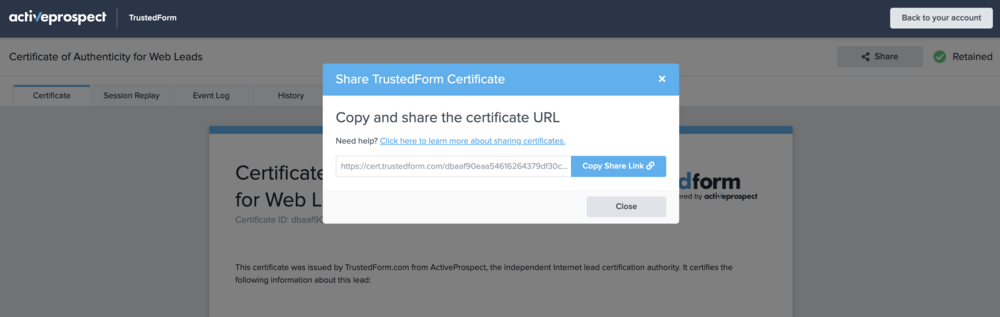
Once stored, you can share a certificate with parties outside your organization by viewing it and copying the special share URL, which doesn’t require authentication to access. This feature is especially useful when responding to demand letters or during active litigation, as it allows you to show when a consumer consented to be contacted or provide evidence to your legal counsel.
TrustedForm share URLs are openly viewable by anyone who receives them, so they should be used cautiously and in accordance with these guidelines.
To obtain the TrustedForm share URL for a certificate, click the “Share” button in the top right corner of the certificate and then click “Copy Share Link” to automatically copy the URL to your clipboard.
Step 5: Store leading indicators of performance
If you want to boost your ROI by identifying high-quality leads, consider using TrustedForm Insights. Use your lead distribution platform to make an API request to retrieve various data points for each lead. Store this information in your CRM or data warehouse for future analysis.
By correlating this data with lead outcomes, you can pinpoint which attributes are most predictive of conversion and likely to result in a sale.
Overview of TrustedForm products
TrustedForm includes multiple product options designed to help lead buyers and sellers improve transparency, document consent, strengthen compliance, and optimize performance. Here’s a quick summary of the main TrustedForm products, their core features, and common use cases.
| Product | Key features | Common use cases |
| TrustedForm Certify | Captures lead events and documents consumer consent with a certificate | Proving how a lead was generated, demonstrating transparency and evidence of consent |
| TrustedForm Retain | Stores certificates in your ActiveProspect account for auditing and sharing | Meeting record-keeping requirements, accessing session replays, and sharing proof of consent |
| TrustedForm Verify | Checks whether prior express written consent requirements are met | Reducing TCPA risk, auditing vendors at scale, and automating consent review workflows |
| TrustedForm Insights | Provides lead-level data points such as originating domain and behavioral signals | Optimizing lead-buying strategies, identifying top-performing sources, and improving ROI |
| TrustedForm Bot Detection | Identifies non-human lead activity and bot-related signals | Detecting fraudulent traffic, reducing wasted spend, and preventing bot leads from polluting downstream systems |
1. TrustedForm Certify
TrustedForm Certify is the core product used to document lead events and any consumer consent that was captured. It creates a certificate that can be used as evidence to prove how leads were generated.
With Certify, you can:
- Fulfill the legal requirements of buyers who need to store proof of consent.
- Attract new customers by demonstrating your dedication to transparency and consent-based marketing.
- Review recordings and statistics of your website’s performance to develop new strategies.
2. TrustedForm Retain
TrustedForm Retain stores certificates in your ActiveProspect account and makes them readily available for auditing and sharing as needed.
With Retain, you can:
- Meet the record-keeping requirements set by federal rules and regulations.
- Watch session replays to see how leads were generated.
- Offer a certificate share URL that provides evidence whether expressed consent was given.
3. TrustedForm Verify
TrustedForm Verify checks for prior express written consent to enable use of regulated technology and otherwise restricted actions.
With Verify, you can:
- Mitigate risk by ensuring your requirements for obtaining prior express written consent are met and presented digitally, enhancing your ability to audit at scale.
- Evaluate compliance consistently, reducing the chance of errors that can occur with manual processes, especially when managing multiple vendors.
- Increase productivity by saving time through automated tasks, reducing the need for time-consuming manual TCPA consent language reviews.
- Consolidate the data you need to assess how well multiple vendors are complying with your requirements.

4. TrustedForm Insights
TrustedForm Insights provides key data points, including originating domain, that allows you to make informed decisions to optimize lead-buying strategies and maximize your ROI.
With Insights, you can:
- Easily identify top-performing lead vendors by tracking leads back to their originating sites.
- Pinpoint high-yielding leads using data points that correlate strongly with lead performance, such as Lead Age, Originating Domain, GeoLocation, IP Address, Time on Page, Form Input Method, and Keyword/Page Scanning.
5. TrustedForm Bot Detection
TrustedForm Bot Detection helps buyers and sellers identify non-human lead activity before it creates downstream costs. By surfacing signals associated with automated submissions, it gives teams greater visibility into suspicious traffic and helps them separate legitimate leads from bot-generated ones.
With Bot Detection, you can:
- Detect fraudulent or non-human lead activity earlier in the buying process.
- Reduce wasted spend on leads that do not come from real consumers.
- Prevent bot traffic from polluting CRM data and distorting performance analysis.
- Strengthen source-level accountability with clearer visibility into suspicious traffic patterns.
- Improve optimization decisions by making bot activity measurable, trendable, and actionable.

FAQs
1. How can I retain a TrustedForm Certificate?
You can retain a TrustedForm Certificate in several ways, depending on your setup.
If you use Auto-Retain, certificates from a verified domain are stored automatically when a consumer submits a form. If you prefer a manual approach, you can retain a certificate through the TrustedForm Retain API by sending the certificate URL along with lead details like phone number or email for validation.
You can also retain certificates through LeadConduit by adding the TrustedForm add-on to your flow, which automatically sends the retain request when a lead comes in. In some cases, UI-based Click-to-Retain may also be available. By default, retained certificates are stored for up to 5 years.
2. How does TrustedForm pricing work?
TrustedForm pricing is based on how you use each product.
TrustedForm Certify is free, so you can generate unlimited certificates at no cost.
TrustedForm Retain is priced per retained certificate and uses tiered pricing, with lower rates for higher volumes; pricing is also lower for first-party leads from verified domains than for third-party leads from unverified domains. In addition, retained certificates incur a small monthly storage fee per certificate.
TrustedForm Insights is billed per datapoint requested, so each insight such as Lead Age, Domain, IP Address, Geo Location, Page Scan, Form Input Method, or Time on Page is charged individually.
TrustedForm Verify is also priced on a tiered per-lead basis. TrustedForm charges are separate from LeadConduit transaction fees, so TrustedForm usage does not count as a LeadConduit transaction.
Final thoughts
In a time where trust is currency and compliance is non-negotiable, TrustedForm setup offers a proven way to verify consent, reduce risk, and elevate lead quality.
From capturing proof of consent with Certify, to storing records long-term with Retain, to verifying compliance at scale through Verify, and optimizing vendor performance with Insights – TrustedForm provides a full suite of tools to help you take control of your lead generation strategy.
Ready to build a more trustworthy and compliant lead gen program? Book a demo to see it in action. Because when it comes to consent, proof isn’t optional – it’s essential.